Baby Buddy import
Move your Baby Buddy history without starting over.
Baby Buddy is a free, self-hosted baby tracker you run on your own server. Rhythm reads its API directly, no export file needed, and lets you preview the counts before anything is saved.
Baby Buddy is a great self-hosted application, and it's what I used before building Rhythm. If you're looking for quality sleep predictions without giving up control of your data, Rhythm keeps the local-first principle and drops the server maintenance. Point it at your instance, pick the child, and review the counts before anything is saved.
No account is required for a local import. Rhythm reads your Baby Buddy API; it never writes back.
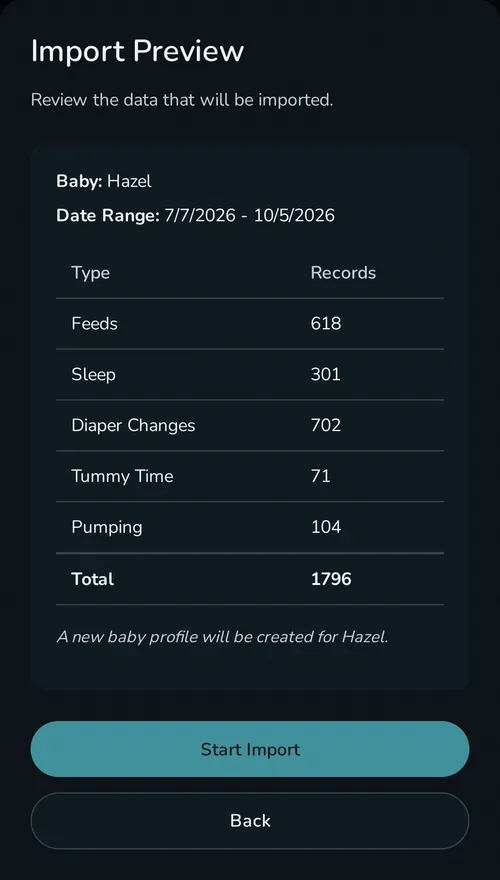
What comes across
Rhythm imports five Baby Buddy record types: feedings, sleep, diaper changes, tummy time, and pumping. You can create a new baby profile during the import or add the history to one that already exists. Anything else stays in Baby Buddy.
Imports are safe to repeat. Each record gets a deterministic ID, so running the import again after logging a few more days in Baby Buddy picks up the new records and skips the ones you already moved.
Nothing changes on your server. Rhythm reads through Baby Buddy's own API and does not write, edit, or delete anything there. If Rhythm isn't for you, your instance is exactly where you left it.
How to move your data
- In Baby Buddy, open your user settings and copy your API token.
- In Rhythm, open Settings, Import Data, Baby Buddy.
- Enter your Baby Buddy URL and the token.
- Pick the child, choose a new or existing profile, review the counts, and import.
The import runs in your browser, so your Baby Buddy server has to be reachable from the device running Rhythm. If your instance only exists on your home network, run the import from a device on that network.
Questions
Does the import change my Baby Buddy data?
No. Rhythm only reads from the API. Your instance keeps running untouched.
Can I run the import more than once?
Yes. Duplicate detection skips records that already came across, so a second run only adds what's new.
What about record types Rhythm doesn't import?
The five types above are what moves today. Everything else stays readable in Baby Buddy, and Baby Buddy's own export still covers it.
Can I get my data back out of Rhythm?
Yes. JSON is the full backup format and CSV puts the history in a spreadsheet, both free and available anytime in Settings.
Last updated: September 2026