Calm Mode: a baby tracker that doesn't nag you.
Calm Mode is a setting in Rhythm that turns off precise timers, warning colors, and predictions, so logging stays a plain record. Everything is still saved. The dashboard just stops counting.
Some days the timer helps. Some days you just want the log.
Last updated: September 2026
For the days the numbers get in the way.
Some days the numbers help. Other days a countdown saying the nap window opens in 40 minutes is the last thing you need while your baby is happy on the floor. Calm Mode is for those days: the same record, with the countdowns and warnings out of sight.
What Calm Mode does.
Calm Mode is a one-tap toggle that softens Rhythm so that you can focus on Baby's cues.
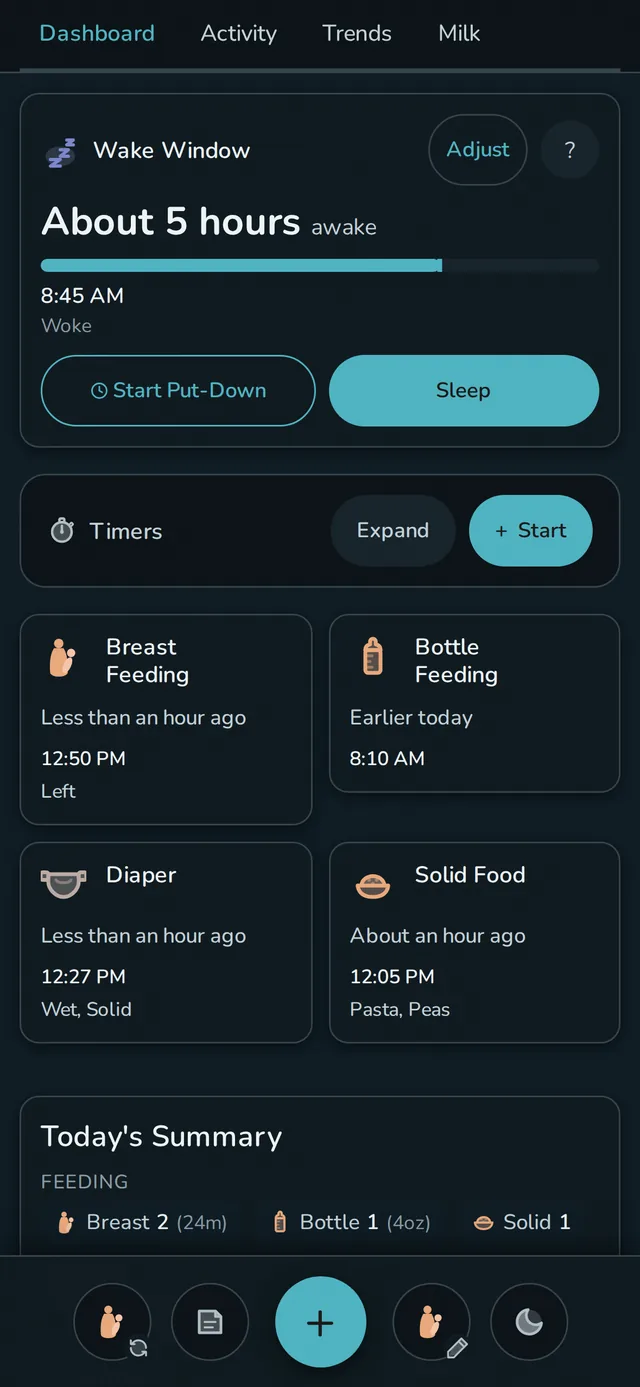
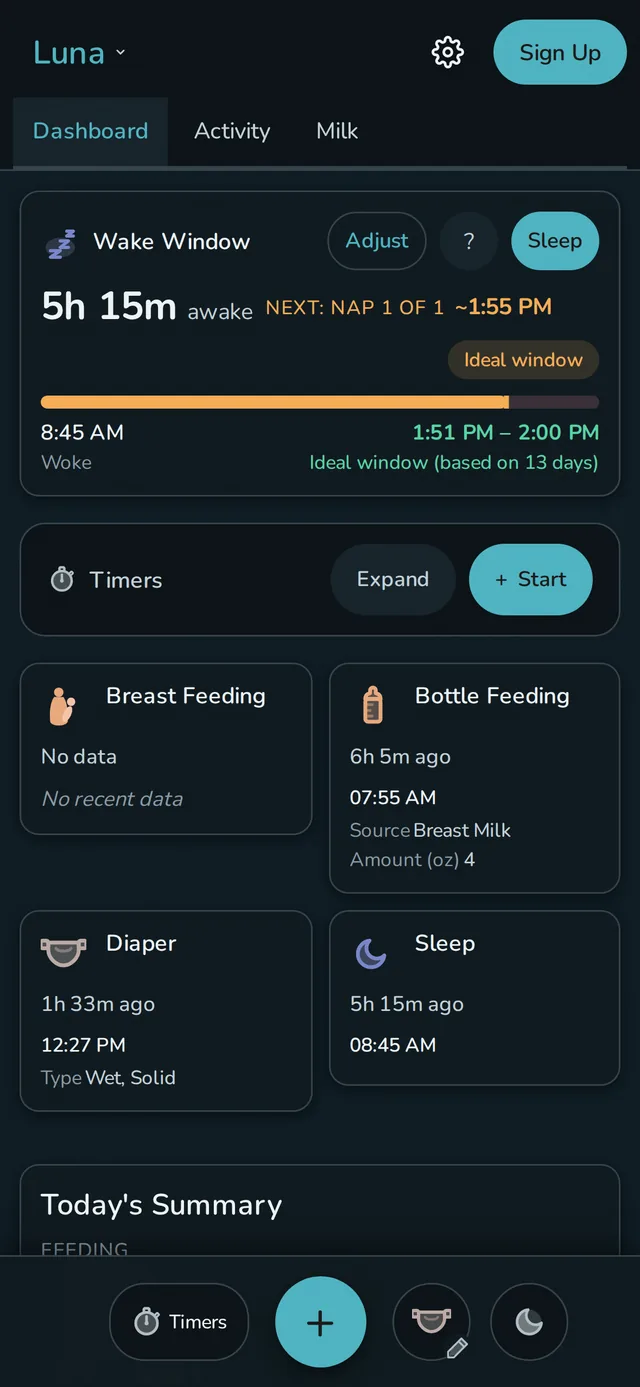
- Precise timers become vague. "2h 34m ago" turns into "a few hours ago." "21m ago" becomes "less than an hour."
- Warning borders disappear. No more red rings around overdue tiles.
- Predictions hide. No "next wake window in 47m." No "bedtime estimated at 8:13 PM." No countdown.
- Pattern analysis and night-sleep statistics hide. The graphs are still there if you want them; just in the background.
Nothing stops being saved. Your data is still tracked at full precision behind the scenes - you can toggle Calm Mode off whenever you want and the numbers are right where you left them.
Use it when you want it.
Rhythm has thresholds and timers and predictions because that's what a tracker does - and sometimes those numbers are exactly what you need. Calm Mode is the acknowledgment that sometimes they're not. If a specific tile is the thing stressing you out, you can hide it permanently in customization. If it's the whole dashboard, Calm Mode covers it in one tap.
Anxiety relief without quitting tracking.
The standard advice for tracking anxiety is to delete the app and go back to paper. That works, but it costs you the record: the pediatrician question you can't answer, the pattern you never get to see, the 3 AM argument about whether the last feed was at 1 or at 2. Calm Mode is the middle path. The log keeps itself at full precision while the dashboard stops counting.
It also pairs well with simply tracking less. If pumping volumes or tummy-time minutes are the stressful part, remove those event types and keep the two or three you actually use. Rhythm treats a short list as a valid way to run a tracker, not a downgrade.
How to turn it on.
Calm Mode lives in Settings, under Dashboard. Flip it there and the whole app calms down. If you want it one tap away, open Settings, then Quick Actions, and drop Toggle Calm Mode into any of the four sidebar slots around the big "+", left or right, whichever side your thumb reaches at 3 AM. Per-device, so your partner's dashboard isn't affected.
Questions
Does Calm Mode stop recording data?
No. Everything is still saved at full precision behind the scenes. Toggle Calm Mode off and the exact numbers are right where you left them.
How does Rhythm reduce baby-tracking anxiety?
Calm Mode makes timers vague, removes warning borders, and hides predictions in one tap. If a single tile is the stressful one instead, hide it permanently in customization and leave the rest alone.
Is Calm Mode free?
Yes. It's part of the free tracker on one device, not a paid extra.
Does it affect my partner's phone?
No. Calm Mode is per-device, so you can have a calm dashboard while your partner keeps the precise one.
No signup. Works in any browser.