Wake-window tracker
A wake-window estimate you can question.
A wake window is the stretch of time a baby stays comfortably awake between sleeps, and it grows with age: about 45 to 60 minutes for a newborn, 2 to 3 hours around 6 to 9 months, and 4 to 6 hours past 18 months. Rhythm starts from an age range. Once there is enough logged sleep, it switches to the middle half of your baby's own wake windows for that nap, and the card says which basis it used and how many naps it learned from.
I built Rhythm after staring at my son's sleep history and trying to figure out, "When should the next sleep start?" Rhythm starts with an age range, can use the sleep you log, and says which basis it used. If the range does not fit your baby, change it or ignore it.
Rhythm tracks sleep and shows estimates. It does not prescribe a sleep plan.
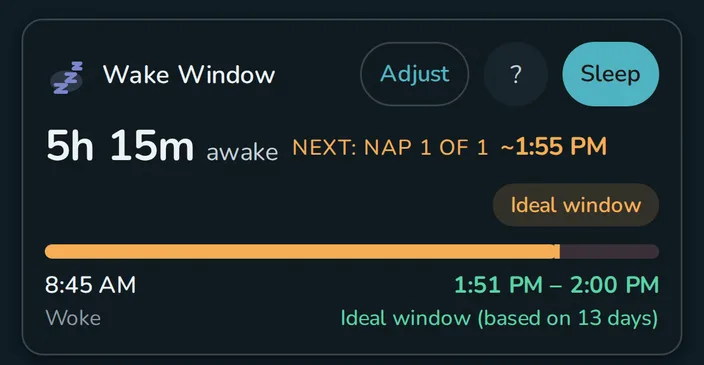
Start before there is enough history
Rhythm can show an age-based range while it is still learning. After enough sleep is logged, it can use that history and show the number of days behind the estimate. The dashboard turns the range into clock times from the last wake-up.
The source is part of the result. The explanation labels an age default, a range from your data, or a manual setting.
Keep the parent's judgment in the loop
Set your own range
A custom minimum and maximum overrides the calculated range. Nap-position settings can be adjusted separately when the first nap and bedtime do not behave alike.
See when the sample is thin
The interface withholds some position details when confidence or sample size is too low. When the result is broad and weak, Rhythm stays in a learning state.
Start, stop, and predict sleep even with no internet
Sleep history and the wake-window calculation run on the device and work offline. A free setup stays on that one device. Household sync is useful when two caregivers need their sleep logs in the same current picture.
Questions
Is Rhythm a sleep-training program?
No. It records sleep and offers an adjustable estimate from the information available. It does not prescribe a sleep plan or replace a pediatric professional.
Does it use AI?
No, Rhythm's calculations do not use AI or Machine Learning.
Can I set my own wake window?
Yes. A manual setting overrides the calculated range.
Last updated: September 2026