Pattern insights
What happened before the better nights?
Pattern insights compare the days around a logged event, like a feed or an activity, to days without it, and report whether sleep or ratings changed. Rhythm runs this comparison on your own logged history, on your device, and shows the numbers behind the result.
Most baby trackers can tell you how much sleep happened. Rhythm checks what happened before it, what tends to follow a feed or activity, and which kinds of days you rated better. Then it shows the comparison behind the result.
Runs on your device, using your own logs. No AI or account required.
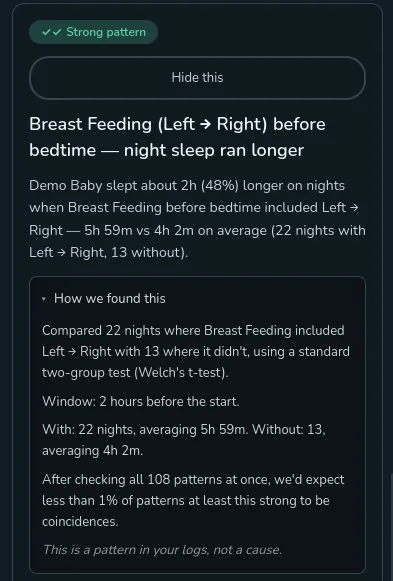
The comparison is the feature
This result found night sleep was about two hours longer when left-to-right breastfeeding happened in the two hours before bedtime: 5h 59m across 22 nights, compared with 4h 2m across 13 nights without it.
It does not stop at "Strong pattern." Open the card and Rhythm shows what it compared, the time window, the averages on both sides, and how the result held up after checking every other possible pattern at the same time. This scan checked 108.
This is not another totals chart
The baby trackers I checked chart routines, summarize totals, or predict the next nap. All useful. I could not find another one that checks how one part of your baby's day changes with another and shows the comparison behind it.
- What happened in the two hours before longer or better-rated sleep?
- What tended to follow a feed, activity, or nap?
- Which events came up more often on the days you rated higher?
The questions grow with your tracker
Built-in feeds, sleep, solids, and activities are only the start. Every custom event can join the same analysis. Add Reading, Stroller Walk, Screen Time, Daycare, or Grandma Visit and Rhythm can look for what changed around it once you have logged it often enough.
Fields count too. If you add a Music event with an Artist field, Rhythm can compare nights with one artist against the rest of the music you logged. A food tag can be compared with the other solid foods, instead of pretending all lunch entries were the same.
The boring rows stay visible
Check enough combinations and something will look interesting by accident. Rhythm corrects for that before a result becomes a card. It also keeps the full list of what it checked: strong patterns, weak ones, and the rows that still need more data.
Those rows matter. They tell you what Rhythm tested and chose not to turn into a claim. A new event needs repeat logs across several days before it enters the analysis, and both sides of a comparison need enough examples to be useful.
Plain statistics, on your device
Rhythm uses ordinary statistical tests over the last 90 days of logs. The scan runs on your device in milliseconds, with no AI model and no chatbot behind the result. If you turn on household sync, your logs sync to my servers, but the analysis still runs on your device. The server stores your data; it is not where insights come from. Dismissals and feedback stay on the device.
A pattern is a place to look
Longer sleep after a routine does not prove the routine caused it. Bedtime, illness, teething, or a dozen things that never made it into the log may explain the difference. Rhythm calls it a pattern and stops there. It does not tell you what you should do next.
If a pattern involves medicine or supplements, the card says that your logs are not medical research. Your pediatrician still gets the last word.
Questions
How much data does it need?
An event generally needs about ten logs before Rhythm checks it, with enough examples on both sides spread across several days. Until then, it shows "More data needed."
Can it use custom events and fields?
Yes. Custom event types take part like built-in ones. Choice and tag fields can be compared once a value has enough examples.
Does it use AI?
No. The calculations use standard statistical tests and run on your device.
Does a pattern mean one event caused the other?
No. It means the two went together in your logs often enough to be worth noticing. Rhythm does not claim a cause.
Is it free?
Yes. Insights and local tracking are free on one device.
Last updated: September 2026