Huckleberry export
Export your Huckleberry data in four taps.
A Huckleberry data export is a CSV file the app emails you with your child's full sleep, feeding, diaper, and other logged history. Huckleberry treats it as a one-way backup: the app does not accept the file back in, so the export is for keeping the record or moving it somewhere else.
The steps are below. Once you have the file, you don't have to do anything with it, but if you want to see the history in another tracker, Rhythm can preview and import it before anything is saved.
No account is required for a local import. Rhythm lists unsupported record types before you continue.
Export your Huckleberry data
- In Huckleberry, tap the child profile icon in the menu bar.
- Scroll down and tap Export tracking data as CSV.
- Tap Got it! Email it.
- Open the email and download the CSV file.
Huckleberry sends one export per child, so repeat the process for another baby. Its download link is valid for 24 hours; if it expires, request a fresh one from the same menu. Those details come from Huckleberry's own export instructions.
Moving your Huckleberry history to another app
Rhythm isn't the only place the CSV works. Rhythm reads it directly, for free, and shows you the record counts by type before anything saves (the walkthrough is next). nappi reads the same file through a web importer with a preview and duplicate skipping. Pump Log reads it too, but only for pumping, since it's built around milk supply rather than general tracking. Baby Buddy takes CSV and xlsx through its own admin screen, but the columns have to match Baby Buddy's format, so a Huckleberry export needs converting first; its import docs cover the steps.
For the full table with sources for each app, see which baby trackers import Huckleberry data.
Then, see it in Rhythm
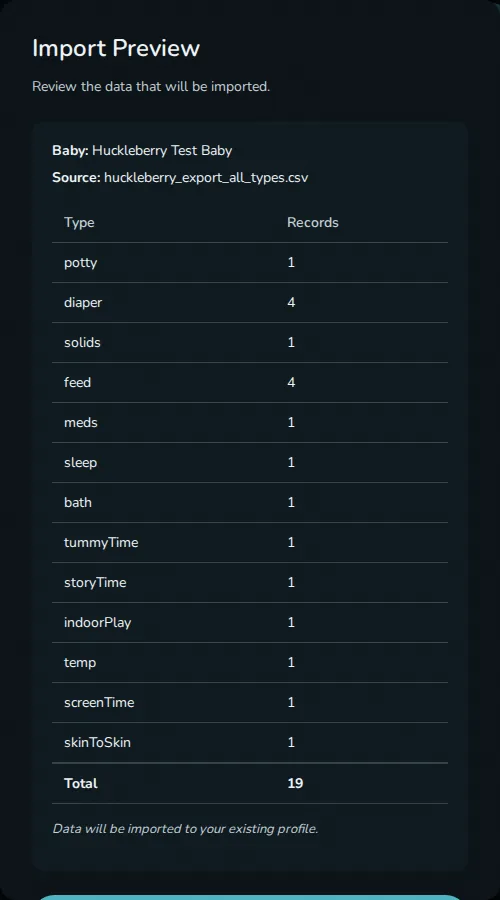
The CSV file just sits there unless something reads it. If you want to check what a different tracker looks like, open Rhythm's Settings, Import Data, Huckleberry, choose the file, and review the counts before anything is saved. Rhythm currently imports sleep, nursing and bottle feeds, solids, diapers, potty, pumping, medicine, temperature, baths, tummy time, screen time, story time, indoor play, and skin-to-skin. You can create a baby profile during the import or add the history to one that already exists.
Huckleberry can change its export. If the file contains a type Rhythm does not support, the preview counts it under "Skipped types."
Nothing changes in Huckleberry. Rhythm reads the CSV file you choose; it does not sign in, write back, or delete your old history. If you decide Rhythm isn't for you, your Huckleberry history is right where you left it.
Questions
Is Rhythm a free baby tracker app?
Yes, on one device. Import and tracking need no account. Household sync is the paid part.
Can I import the CSV back into Huckleberry?
No. Huckleberry states that it does not support importing data into the app. Your existing Huckleberry history stays where it is, but anything you log somewhere else afterwards will not appear there.
Can I import more than one baby?
Yes. Huckleberry exports each child separately, so import each CSV into the matching Rhythm profile.
What happens to unsupported records?
They are counted by type in the preview and skipped. Supported records still import.
Last updated: September 2026