Nara Baby export
Export your Nara Baby data in four taps.
Nara Baby exports one CSV file per child from your Account screen. It holds everything you logged for that child: sleep, feeds, pumping, diapers, medicine, milestones, and growth measurements.
The steps are below. If you want that history in Rhythm, open the file in Rhythm's importer, check the counts in the preview, and nothing is saved until you say so. You can see Rhythm with your own baby's data before deciding anything.
No account is required for a local import. Nothing changes in Nara.
Export your Nara Baby data
- In Nara, open Account.
- Tap Family.
- Tap your child's name.
- Scroll down and tap Export Data.
Nara saves the CSV file to your phone. Import it there, or move it to whichever device you'll import from.
Don't open or re-save the file in a spreadsheet first. That changes the timestamps, and Rhythm will ask you to export again.
Nara exports one file per child, so repeat the steps for another baby. You can still export after the trial ends or the account goes read-only; Nara's own FAQ says a family without a subscription can view and export existing data.
What comes across
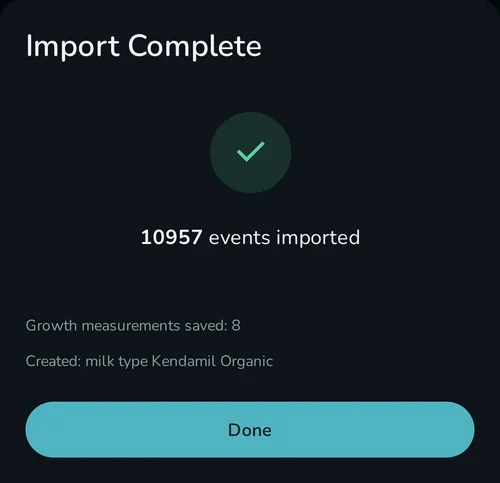
Everything. Sleep, feeds, pumps, diapers, growth, vaccines, and everything else in the CSV lands as the matching Rhythm event, none of it dumped into notes. Open Settings, Import Data, Nara, choose the file, pick or create the baby it belongs to, and review the counts before anything is saved.
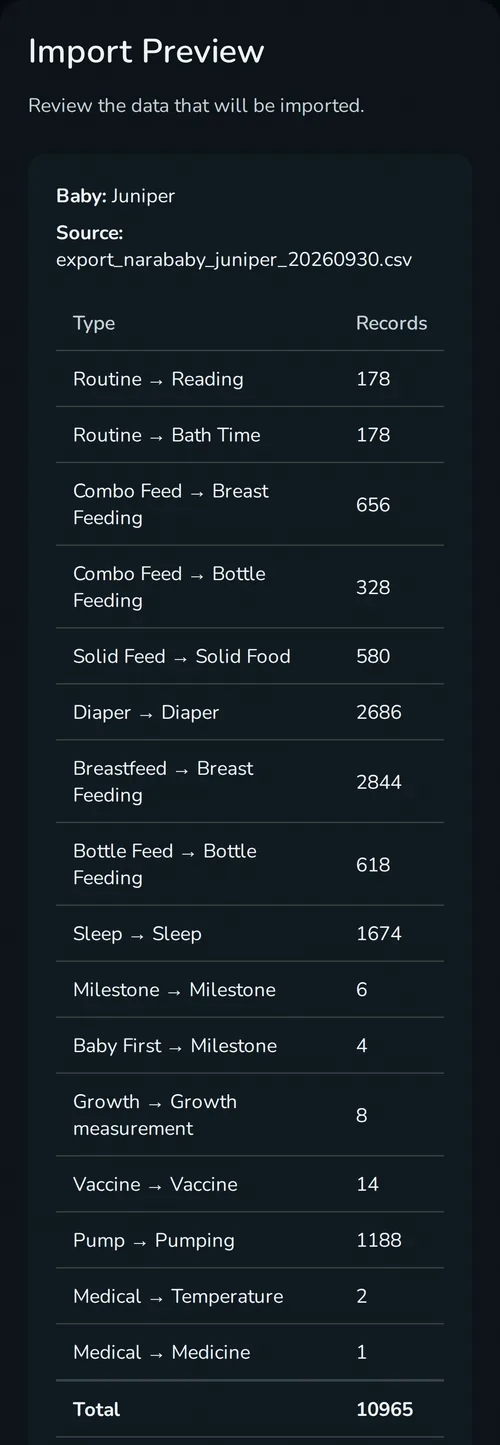
If the file has a type or column Rhythm doesn't recognize, the preview lists it by name instead of dropping it quietly.
What stays in Nara
Two things don't come across because Rhythm has nowhere to put them: which caregiver last edited an entry, and whether Nara recorded it with its timer or you typed the time in. Both are a record of how the entry was made, not what happened, so the history reads the same without them.
Nothing changes in Nara. Rhythm reads the file you choose; it never signs in to Nara and never writes anything back.
You can import more than once: once to try Rhythm, then again from a fresh Nara export after the last entry you log there. Entries already imported are overwritten, not duplicated. That also means an edit you made in Rhythm to an imported entry is replaced the next time you import. A feed, sleep or other entry you deleted in Rhythm stays deleted, but a growth measurement you deleted comes back.
Questions
Can you export data from the Nara baby app?
Yes. Open Account, then Family, tap your child's name, scroll down, and tap Export Data. Nara saves the file for you. It's a CSV with one file per child, and Nara's FAQ says it stays available without a subscription.
Will I lose my Nara Baby data if I don't subscribe?
No. Nara's FAQ says a family without a subscription goes read-only: everything already logged stays there to view and export, but you can't add new entries. The file holds everything up to the day you make it, so export after the last entry you log in Nara.
Do I need to cancel Nara before I import?
No. Rhythm reads the file you export and never signs in to Nara, so the order doesn't matter. You could even import your Nara history into Rhythm, for free, to see what Rhythm looks like before canceling Nara.
Is Rhythm a free baby tracker app?
Yes, on one device. Import and tracking need no account. Household sync is the paid part.
Can I share it with my partner?
Yes, with Household sync, the paid plan. It covers the whole household, so a partner or caregiver sees the same history on their own phone. See how sharing works.
Can I import more than one baby?
Yes. Nara exports each child separately, so import each file into the matching Rhythm profile. Pumping sessions aren't tied to a child in Nara's file, so they go to the first baby you import; importing a second child doesn't move them.
Does my pumping log come across?
Yes. Each pump session keeps its start time, duration, and volumes. If you logged left and right separately, each side arrives as its own entry. Imported sessions are history and don't change Rhythm's milk stash, so if you keep a freezer stash, add the bags you have now and the stash tracker picks it up from there.
What happens to records Rhythm doesn't recognize?
They're listed in the preview and the summary by name. Everything else still imports.
Last updated: September 2026